


SKU:
exocad DentalCAD
- In stock, ready to ship

exocad DentalCAD is one of the most powerful and comprehensive laboratory design softwares. At Gro3X you choose three things: the license type (Flex or Perpetual), what you want to do (Initial Purchase for year one, Renew Annual License for year two onward, or Refresh an Expired Perpetual License) and the software option (a bundle or a single module).
DentalCAD Elefsina at a glance (PDF)
DentalCAD bundles
DentalCAD Core Version
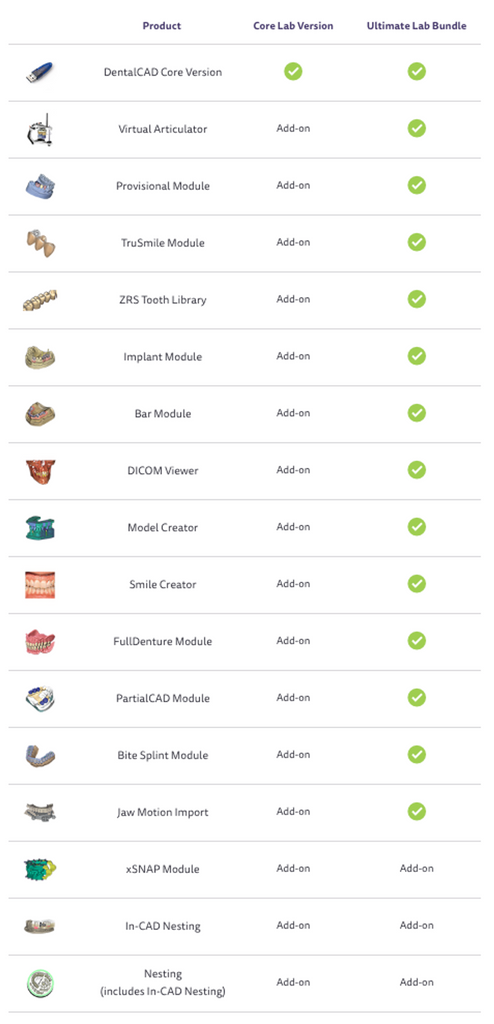
The Core Version comes with the "core" CAD design modes as well as open tooth and material libraries. It can be further complemented with any available stand-alone module.

DentalCAD Implant Bundle
The Core Version plus:
- Virtual Articulator
- Provisional Module
- TruSmile Module
- ZRS Tooth Library
- Implant Module
- Bar Module
- DICOM Viewer
Additional add-on modules can be activated separately.
DentalCAD Ultimate Bundle (recommended)
The Core Version plus ALL CAD modules at one highly discounted price, compared to purchasing the included modules individually. Each lab DentalCAD Ultimate Bundle comes with FREE training for you + 1 guest: 2-day hands-on courses, either in person at AA Dental Academy in Murrieta, CA or online from your lab or home. See the AA Dental Academy training calendar.
Add-on modules
Available as single software options: Implant Module, Virtual Articulator, Jaw Motion Import, Bar Module, Model Creator, SmileCreator with TruSmile Module, Provisional Module, DICOM Viewer, Bite Splint Module, Full Denture Module, PartialCAD Module, ZRS Tooth Library and TrueSmile Module.
- The Jaw Motion Import Module works only in combination with the Virtual Articulator Module.
- To design bars on implants, the Implant Module is required.
- The SmileCreator works only in combination with the TruSmile Module.
DentalCAD comes by default with two ZRS sets; the complete ZRS Tooth Library module can be added, at no additional charge with the Ultimate Bundle.
Flex or Perpetual license?
1) Perpetual License
A Perpetual License remains active for twelve (12) months after initial activation. At the end of this period you choose whether to keep it ACTIVE or let it become PASSIVE (dormant):
- Purchase an Annual Upgrade Contract: the license stays ACTIVE, with continued access to software updates, support and the ability to import tooth and implant libraries, among other benefits.
- Do nothing: the license becomes PASSIVE. You may keep using the software indefinitely, but frozen in its current state: no future software updates, no technical support, no importing of new libraries, and no license transfer or reactivation if your dongle fails.
Refresh Program: a dormant (PASSIVE) Perpetual License can be reactivated through the Refresh Program, which upgrades you to the latest version and restores all active-license benefits. It requires a one-time refresh fee plus the current annual upgrade fee.
| Pros | Cons |
| License never expires | Higher initial investment (year 1) |
| Lower annual upgrade fees | Dongle can't be replaced if lost or stolen |
| Annual upgrades can be skipped, then rejoined through the Refresh Program | exocad does not offer technical support for licenses without an upgrade contract |
2) Flex License (annual subscription)
Flex Licenses are subscription-based: a lower upfront cost than the Perpetual License, but a higher annual renewal fee. The software deactivates if the license is not renewed.
- Renew annually: keeps the license active, with continued access to all features, including software updates and library imports.
- Let it expire: the license expires and cannot be reactivated.
| Pros | Cons |
| Cheaper to get started | More expensive after about 5 years |
| Updates included | License expires after one year if not renewed |
| Can be replaced if the dongle gets lost or stolen |

Break-even between Perpetual and Flex license is in year 5.
Renewing or upgrading an existing license? See Upgrade/Renewal.
After you order
Please allow 3-5 business days for delivery. Before ordering, review the exocad hardware requirements; for installation, download and install Google Chrome Remote Desktop on the hardware-compliant computer you want to use for exocad. Installation guides, libraries and beginner videos are on our exocad Support page. Planning implants too? See exoplan and the full exocad collection.
SmileCreator
Download the SmileCreator brochure (PDF)
Implant Module
Product Questions
Frequently Asked Questions
Helpful information about exocad DentalCAD, its intended use, and the recommended workflow.
How much does exocad DentalCAD cost?
The price depends on three choices: license type (Flex or Perpetual), whether it is an Initial Purchase (year one), an annual renewal (year two onward) or a Refresh of an expired Perpetual License, and the software option (Core Version, Implant Bundle, Ultimate Bundle or a single module). Select these options on this page to see the current price. Financing is available.
Is DentalCAD available as a free download?
DentalCAD is sold as a paid license: either a Flex License (annual subscription) or a Perpetual License. After you order, please allow 3-5 business days for delivery.
Can I use DentalCAD online or remotely?
DentalCAD is installed on your own computer, which should meet the exocad hardware requirements. For installation, download and install Google Chrome Remote Desktop on that hardware-compliant computer. Installation help is on our exocad Support page.
What is the difference between a Flex and a Perpetual license?
A Flex License is an annual subscription: lower upfront cost, higher annual renewal fee, updates included, and the dongle can be replaced if lost or stolen; if not renewed it expires and cannot be reactivated. A Perpetual License costs more in year 1 and never expires, with lower annual upgrade fees; without an upgrade contract it becomes PASSIVE (no updates, technical support or new libraries). The break-even between the two is in year 5.
What happens if I don't renew my exocad license?
A Flex License expires and cannot be reactivated. A Perpetual License becomes PASSIVE (dormant): you can keep using it indefinitely in its current state, without updates, technical support, new library imports, or license transfer or reactivation if the dongle fails. A dormant Perpetual License can be reactivated through the Refresh Program (a one-time refresh fee plus the current annual upgrade fee).
What is included in the DentalCAD Core Version, Implant Bundle and Ultimate Bundle?
Core Version: the core CAD design modes plus open tooth and material libraries. Implant Bundle: the Core Version plus Virtual Articulator, Provisional Module, TruSmile Module, ZRS Tooth Library, Implant Module, Bar Module and DICOM Viewer. Ultimate Bundle: the Core Version plus all CAD modules at one discounted price compared to buying the modules individually, with free training for you + 1 guest.
Which DentalCAD modules require another module?
Jaw Motion Import works only with the Virtual Articulator Module. Designing bars on implants requires the Implant Module. SmileCreator works only with the TruSmile Module.
Does exocad DentalCAD include training?
Each lab DentalCAD Ultimate Bundle comes with free training for you + 1 guest: 2-day hands-on courses, in person at AA Dental Academy in Murrieta, CA or online.
I already use exocad. Can I switch to Gro3X as my reseller?
Yes. Download the exocad NA Reseller Transfer form from our exocad Support page and initiate the transfer.